
How To Check SNGPL Duplicate Bill Online check: Easy to check your SNGPL Duplicate Bill by clicking the button below Check Bill and enter your 11-digit Consumer Number. SNGPL stands for Sui Northern Gas Pipelines Limited (SNGPL). It was established in the year 1963 under the Companies Act 1913. It provides the facility of sngpl online bill check for its users. You can check SNGPL bills Online free of cost duplicate bill checking facility.
How To Check SNGPL Duplicate Bill Online
Are you a customer of Sui Northern Gas Pipeline Limited? If so, did you know that you can check your SNGPL bill online?. 24/7 online facility is available to check your SNGPL duplicate bills online. It’s easy for users to keep track of their usage and payments. Also, if you find any errors in your bill, you can directly report them to the SNGPL online web portal.
To check your SNGPL Duplicate Bill, enter your 11-digit Consumer Number and click Check Bill button.
New SNGPL bills for due date up to are available to download
How to Check SSGC Duplicate Bill Online
The account ID or Customer Number must need to check your SNGPL online bill. If you don’t know you can find them on any old bill. Here is a sample screenshot of SNGPL Bill where to find your account ID.
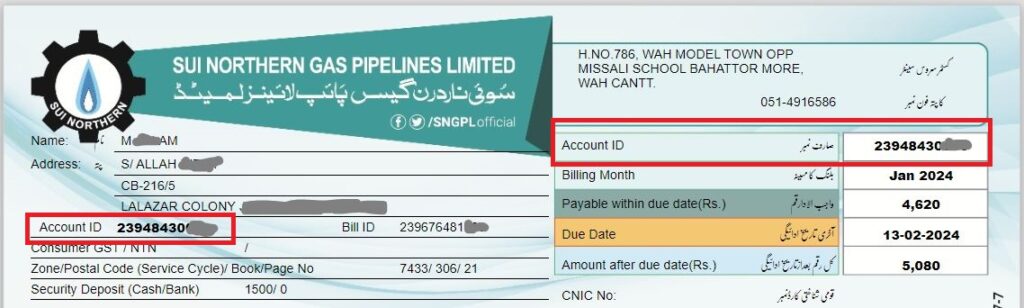
Your bill has two locations where you may find the account ID, commonly referred to as the consumer number. On the bill, the red-highlighted portions are visible. This is the ID number you must enter in the input area above. To view your most recent SNGPL bill, click the “Check Bill” button.
How to Check the SNGPL Online Bill?
- Visit SNGPL Duplicate Bill Online.
- Enter your 11-digit Consumer Number (Printed on your bill).
- Click To Check Bill SNGPL Duplicate Bill.
- It will open a new page.
- Your SNGPL bill is ready to view.
While Sui Northern Gas Pipelines Limited (SNGPL) permits users to register in order to view their gas bills, account creation is not required in order to use our application. All the user has to do to locate their bill is input their account ID.
SNGPL Consumer Bill
- Go to the Sui Northern Gas website.
- Now here you will find the Consumer bill and Industrial Consumers option.
- If you are a domestic user then simply need a Consumer ID in the consumer bill option.
- Fill in the Captcha Image and click on submit button to view your bill.
- To view commercial bills you need to enter your username and password in the Industrial Consumers section.
- Don’t have an account? Make sure to register with SNGPL yourself to log in and check your duplicate bill online.
SNGPL Bill App
To verify your snap duplicate bill, you don’t need to install any extensions because our tool is entirely responsive. To view your bill, just access this page on your mobile device. However, if you’re searching for the SNGPL official software, install it by following the instructions.
- Go to google play store and write “SNGPL APP” in the search bar.
- Click on the Install button to download and install it.
- After installation, open the app and do the registration by entering your Account ID, CNIC Number, and Cell Number.
- Once complete the registration, login into your account and click on “Bill” to view your new bill with complete details.
Sui Gas Helpline
0800-13000 is Sui Northern Gas’s customer care number. You may contact the hotline from anywhere in Pakistan, and it is open around-the-clock.
SNGPL Head Office Address
17-Tipu Block, New Garden Town, Lahore is the address of Sui Northern Gas’s headquarters. The phone number for the main office is 042-99200161. 042-99200162 is the fax number for the head office.
Conclusion
Finally, we would like to stress that the simplest and most practical approach to verify your SNGPL duplicate bill online is by using our online bill checking tool. With a few clicks, you may get your most recent bill—all you need is your Account ID. Now You will not wait till receive SNGPL bill.